Exclusive discounts on IT equipment!



Stop Confusing U.2! Your Complete Guide to This "High-Performance Storage Interface"
YUNLINK
11/5/20253 min read

When talking about SSD interfaces, most people instantly think of M.2 or SATA. However, in the world of enterprise servers and high-end workstations, there's an often-overlooked powerhouse — U.2.
It's not a protocol, nor the drive itself, but it's a crucial "connection key" enabling many high-speed storage scenarios. Let's break down U.2 in plain language. By the end of this, you'll be able to easily distinguish it.
1. First, Understand: What Exactly is U.2?
In simple terms: U.2 is a physical interface specification, officially named SFF-8639. It's specifically designed for high-performance Solid State Drives, responsible for "stably connecting the drive to the motherboard."
Here's a key point: U.2 only governs "how to plug it in," not "how data is transmitted." Think of a phone charger cable: the connector (U.2) determines if it fits your phone, while what flows through the cable – charging current or data (the transmission protocol) – is a separate matter.
Its predecessor was the SFF-8639 interface, later unified under the name U.2. The goal was to accommodate larger capacity, higher-speed SSDs and overcome the limitations of earlier interfaces in performance and compatibility.
2. Three Core Strengths: Why U.2 is Loved in Enterprise Scenarios
1. Supports High-Speed Protocols, No Speed Cap
The U.2 interface natively supports PCIe lanes. This means it can pair with the NVMe protocol (the high-speed standard used in both consumer and enterprise sectors), offering an extremely high-speed ceiling:
With PCIe 3.0 x4 lanes, theoretical bandwidth reaches ~4 GB/s (32 Gb/s).
With PCIe 4.0 x4, bandwidth doubles to ~8 GB/s (64 Gb/s), over 10 times faster than traditional SATA interface (max ~600 MB/s).
It's also backward compatible with SAS and SATA protocols, offering both high speed and legacy device support – maximum flexibility.
2. Durable Physical Design, Built for 24/7 Use
The U.2 interface uses a robust design and typically comes in a 2.5-inch drive form factor (same size as traditional HDDs). This allows it to be securely mounted in drive bays, unlike M.2 drives which are often fixed with a single screw. This design resists vibration and accidental disconnection, making it ideal for servers and data centers running 24/7, ensuring long-term reliability.
3. Supports Hot-Swap, Maintenance Without Downtime
Unlike most SATA and M.2 implementations, the U.2 interface natively supports hot-swapping. Simply put, you can replace a drive without shutting down the system – pull the faulty drive out, plug the new one in. This is critical for enterprises: if a drive fails in a data center server, it can be replaced immediately without taking the server offline, minimizing service disruption.
3. The Easiest Comparison: U.2 vs. M.2 vs. SATA
People often confuse U.2 with M.2 and SATA. Their roles are actually quite distinct, as this table shows:
AspectU.2M.2SATAEssencePhysical Interface ("The Plug")Physical Interface ("The Plug")Physical Interface + ProtocolCommon ProtocolsNVMe, SAS, SATANVMe, SATASATA (Fixed)Speed CapHigh (e.g., ~8 GB/s on PCIe 4.0 x4)High (Same as U.2)Low (Max ~600 MB/s)Form Factor2.5-inch (Requires Bay)Compact (Plugs directly to motherboard)2.5-inchPrimary Use CaseEnterprise Servers, High-End WorkstationsConsumer PCs, LaptopsEntry-level PCs, Legacy SystemsHot-SwapYesNoLimited / Partial Support
4. When Should You Choose U.2? Prioritize These 2 Scenarios
1. Enterprise Needs: Servers, Data Centers
If you're building servers or storage systems, U.2 is the preferred choice:
24/7 operation demands a stable, durable interface.
Hot-swap functionality drastically reduces maintenance downtime.
SAS protocol compatibility integrates with enterprise storage arrays, offering higher security and reliability.
2. High-End Personal Needs: Enthusiast PCs, Professional Workstations
For users in video editing, 3D modeling, or big data analysis who need massive capacity + high speed:
U.2 drives commonly offer capacities up to tens of terabytes, far exceeding typical M.2 max capacity (usually around 4-8TB).
When paired with NVMe, read/write speeds are blazing fast, reducing bottlenecks when handling large files and boosting efficiency.
5. Key Considerations When Buying U.2 Equipment
1. Check Motherboard/Backplane Support First
Not all motherboards have a U.2 port, especially consumer-grade ones (which typically have M.2 and SATA). For personal use, always check your motherboard specs for a U.2 connector. Enterprise server boards and backplanes almost always include them.
2. Identify the Protocol Version
The same U.2 interface can be used with both NVMe and SAS protocol drives, which have different performance and use cases.
Choose NVMe for maximum speed.
Choose SAS for high stability and compatibility with legacy enterprise systems.
Don't buy the wrong type.
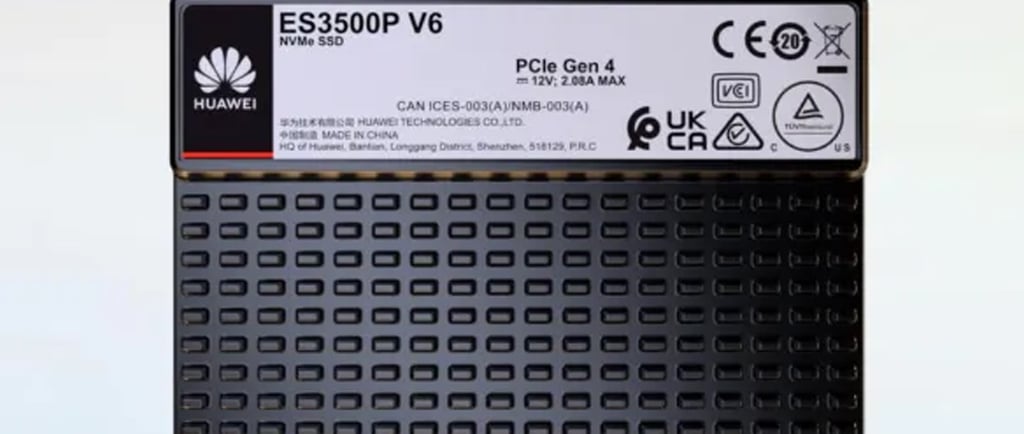
Huawei Enterprise SSD (SATA/SAS/NVMe U.2) Comparison Chart
CategoryCapacity OptionsInterface ProtocolKey CharacteristicsIdeal Use CaseSATA SSD480GB, 960GB, 1.92TB, 3.84TBSATASlower RW speeds, high compatibilityEntry-level storage, legacy system upgrades, cost-sensitive scenariosSAS 12Gb/s SSD480GB, 960GB, 1.92TB, 3.2TB, 3.84TB, 7.68TBSAS 12Gb/sHigh reliability, hot-swap, better performance than SATAEnterprise servers, traditional storage arrays, scenarios requiring high stabilityNVMe U.2 SSD3.84TB, 7.68TB, 15.36TBNVMe over PCIe Gen4 U.2Extremely fast RW speeds, very low latencyHigh-end servers, data centers, performance-critical workloads (Big Data, AI training storage)
Final Summary
While U.2 isn't as ubiquitous as M.2 in the consumer market, it's irreplaceable in scenarios demanding high performance, high stability, and hot-swap capability.